Identify school and community resources and understand how to seek assistance.
 SQUAD 10Credits & Graduation Progress Review
Graded Assignment 03 • SQUAD 10 • Period 6 • B Day • 10:27 AM–12:01 PM • Room N203
Credits & Graduation Progress Review
Use your actual StudentVUE information to understand what you have completed and what still needs attention.
Due Friday, September 18 at 11:59 PM.
Objectives & standardsWhat you’re learning and how success is measured+
Learning objective
I can review my credits and graduation progress and identify the next action needed to stay on track.
Success criteria
- Use StudentVUE or an official transcript to record accurate credit information.
- Identify completed and incomplete graduation requirements.
- Identify courses marked NG and any recovery needs.
- Choose a follow-up action, support person, and completion date.
Oregon Higher Education & Career Path Skills
Practice self-advocacy by communicating needs, concerns, and requests for support.
Monitor academic progress toward graduation requirements.
Demonstrate organization, time management, and personal responsibility.
Employability skills practiced
Academic planning • Information review • Organization • Self-advocacy
Evidence of learning
One verified review of credits, requirements, possible gaps, and a specific follow-up action.
Estimated time
One class period • approximately 30–45 minutes
Activity directions
What to do
Follow these steps, then submit the assigned work in Canvas.
Step 1
Open the Google Doc template and make your own copy.
Step 2
Open StudentVUE and select Course History. Find the Graduation Status section shown in the sample below.
Step 3
Record your own progress exactly as StudentVUE displays it. Flag any partial, zero, uncertain, or NG requirement instead of guessing.
Step 4
Choose one follow-up action, identify the person who can help, and set a completion date.
Step 5
Rename your copy and upload it to Canvas.
Visual guide
Find the graduation-status screen
Use this sample to locate Course History and Graduation Status. The sample is from a different graduating class, so your percentages will be different.
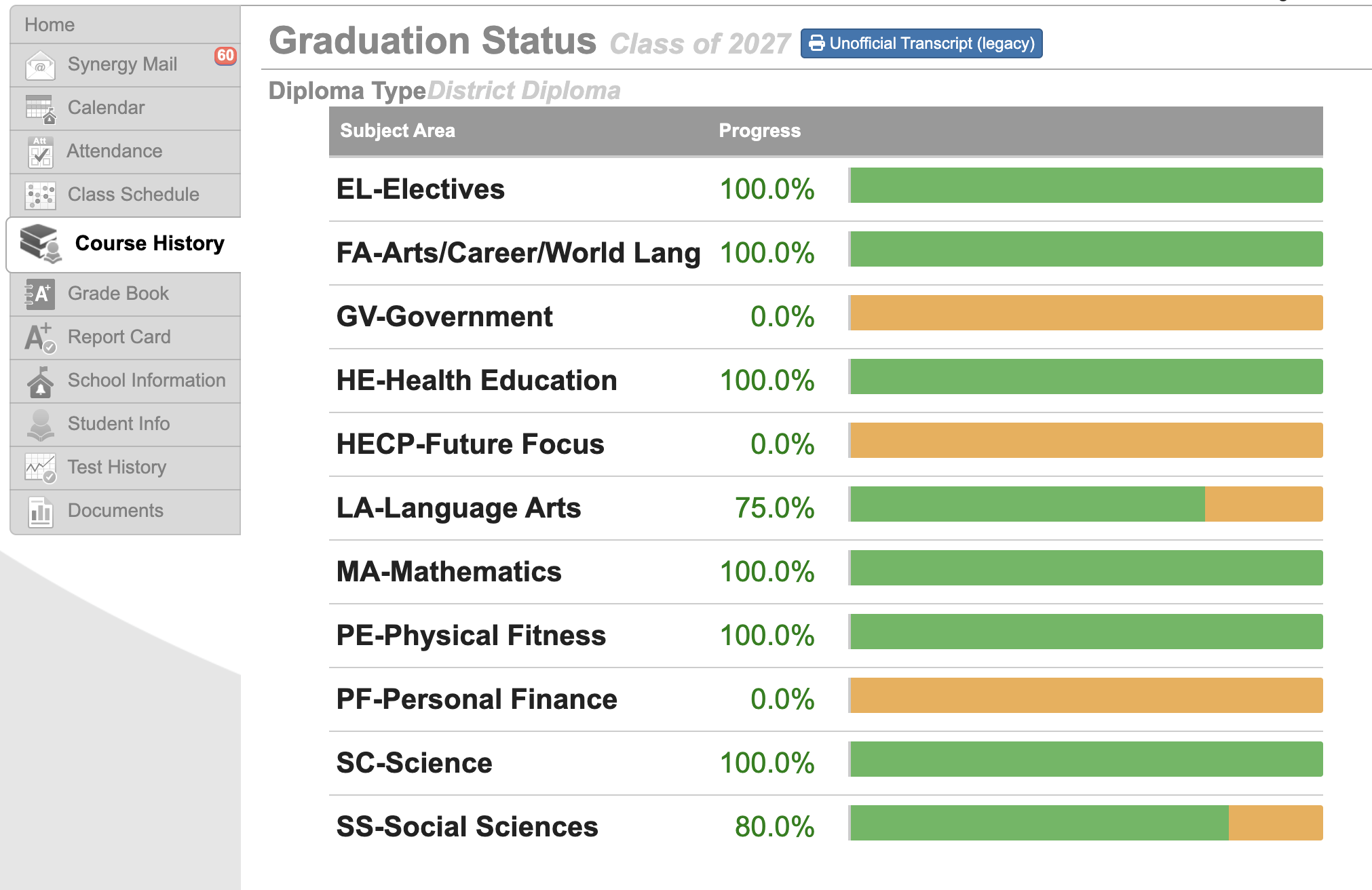
Green progress
A completed or mostly completed bar shows progress already earned in that subject area. Record the percentage StudentVUE gives you.
Orange or partial progress
This shows that part of a requirement remains. Record what you see, then use your schedule or counselor to clarify how it will be completed.
Zero or something unexpected
Do not assume you are off track. A current class may not be reflected yet, or a record may need review. Write a question for your counselor.
Action examples
Respond to what you find
Your follow-up should match the information you discovered in StudentVUE.
Clarify
“Email my counselor by September 25 to ask whether my current Health class will complete the remaining requirement.”
Recover
“Meet with Mr. Jones by September 28 to identify my options for recovering the NG from English 9.”
Protect your progress
“Check Canvas every Tuesday and Thursday and complete missing Biology work before the teacher's posted deadline.”
Resources
Open what you need
These links support the assignment but do not collect work on this website.
Make a Google Doc copy
Create an editable copy in Google Drive, complete it, rename it, and upload it to Canvas.
Open resource →TTSD StudentVUE
Open your official grades, credits, course history, and academic information.
Open resource →Counselor directory
Find your counselor by last-name range when you need help interpreting your record.
Open resource →What to turn in
One completed Credits & Graduation Progress Review document uploaded to Canvas.
Submit through Canvas by the listed deadline. If you complete a paper version, return it directly to Mr. Jones.