Identify school and community resources and understand how to seek assistance.
 SQUAD 12Senior Readiness Check
Graded Assignment 01 • SQUAD 12 • Period 3 • A Day • 12:44–2:11 PM
Senior Readiness Check
Take an honest snapshot of where you are, what you need, and what must happen next.
Due Wednesday, September 9 at 11:59 PM.
Objectives & standardsWhat you’re learning and how success is measured+
Learning objective
I can evaluate my graduation and postsecondary readiness and identify the actions that need attention first.
Success criteria
- Confirm graduation requirements, credits, and current academic status.
- Identify a primary postsecondary pathway and a workable alternative.
- Evaluate current financial-aid or funding readiness.
- Prioritize three specific next actions with dates.
Oregon Higher Education & Career Path Skills
Explore postsecondary pathways and identify necessary training, skills, and prerequisites.
Investigate financial decisions, aid applications, and credible funding sources.
Demonstrate organization, time management, and personal responsibility.
Employability skills practiced
Planning • Decision-making • Organization • Self-advocacy
Evidence of learning
One readiness snapshot with verified graduation information, pathway direction, financial questions, and three dated actions.
Estimated time
One to two class periods
Activity directions
What to do
Follow these steps, then submit the assigned work in Canvas.
Step 1
Open the Google Doc template and make your own copy.
Step 2
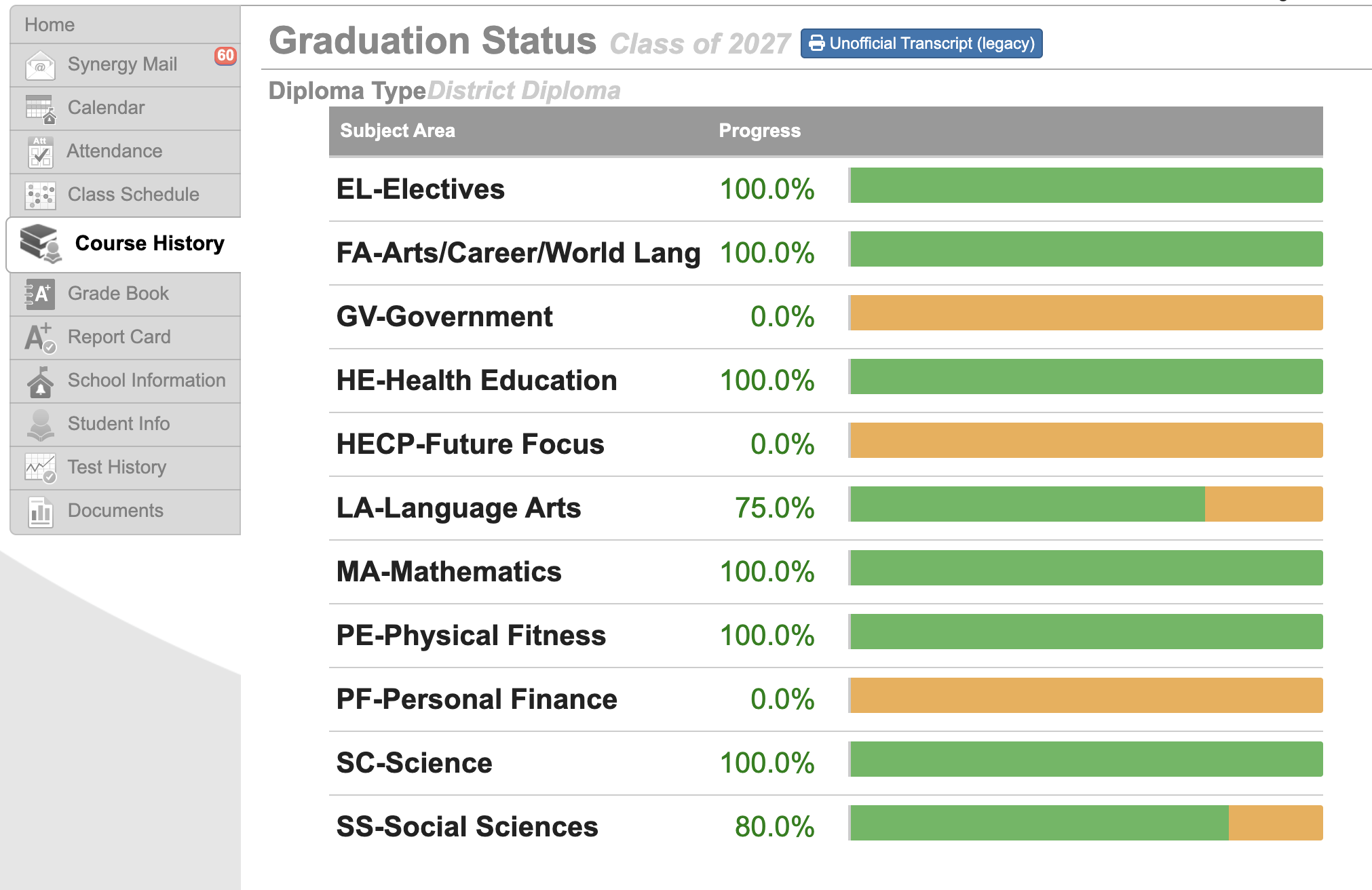
Sign in to StudentVUE. Select Course History, then find Graduation Status. Use the sample below to help you locate the correct screen.
Step 3
Record your credits and requirements exactly as StudentVUE displays them. If something looks missing or incorrect, write down the question instead of guessing.
Step 4
Choose your current primary postsecondary pathway and one realistic backup option.
Step 5
Use the paying-for-your-plan guide below to identify the financial-aid application or funding research that fits your pathway.
Step 6
Choose three useful next actions, give each a realistic completion date, finish the Google Doc, and upload it to Canvas.
Visual guide
Find your graduation status
The Course History screen shows progress toward each graduation requirement. Your screen may look a little different from this sample.
1. Open Course History
Course History—not Grade Book—is where you will find the graduation-status view shown in the sample.
2. Read each subject area
Look at the percentage and progress bar for every requirement. A partial bar means there is still progress to make.
3. Flag questions
A zero, partial requirement, or course that seems missing is a reason to ask—not proof that something is wrong. Record the question and confirm it with your counselor.
Paying for your plan
Start with the right aid information
You are not expected to know all of this yet. Open only the resources that match your plan and record what you need to do next.
FAFSA
For U.S. citizens and eligible noncitizens. Colleges and career schools use it to determine eligibility for federal aid, and Oregon programs also use it.
Open the official FAFSA →ORSAA
Oregon's alternative financial-aid application for eligible students who do not submit the FAFSA. The official guide will help you decide which one to complete.
Compare FAFSA and ORSAA →Oregon Promise
A state grant for eligible recent Oregon graduates attending an Oregon community college. Students apply during senior year and also complete the FAFSA or ORSAA.
Explore Oregon Promise →OSAC Scholarships
One Oregon application can match students with many scholarships. Check the current application window and requirements on the official site.
Explore scholarships →Examples
Choose actions that move your plan forward
Your three actions should be specific, realistic, and connected to your pathway. You do not need to complete every example below.
Graduation
Email your counselor about a missing requirement; schedule a credit-review meeting; or make a plan to recover an NG.
College
Add three schools in SchooLinks; confirm one application deadline; request a transcript; or create your StudentAid.gov account.
Trade or apprenticeship
Compare entry requirements for two programs; attend an information session; or identify the next application window.
Military
Compare two branches or career fields; prepare questions for a recruiter; or choose an ASVAB study resource.
Workforce
Draft a résumé; identify three employers; submit one application; or ask a trusted adult to practice an interview with you.
Resources
Open what you need
These links support the assignment but do not collect work on this website.
Make a Google Doc copy
Create an editable copy in Google Drive, complete it, rename it, and upload it to Canvas.
Open resource →StudentVUE
Use your official credits, GPA, course history, and graduation information.
Open resource →What to turn in
One senior-readiness snapshot and top-three action list uploaded to Canvas.
Submit through Canvas by the listed deadline. If you complete a paper version, return it directly to Mr. Jones.